Configuration
Blender Probe requires the Blender runtime to function; therefore, you must configure the runtime settings before using any of its features.
OptionA: Automatic via blup 🦀
If you manage your Blender versions with blup, no additional configuration is required. The plugin automatically detects the correct Blender executable based on your project’s .blender-version file or the global default.
(This makes it easy to frequently switch the target Blender version for testing, or to track API changes by diffing generated type stubs across versions. The same applies to daily builds, enabling early response to upcoming changes.)
OptionB: Manual Path Configuration
If you don’t use blup, you must configure the path to your Blender executable before using the plugin.
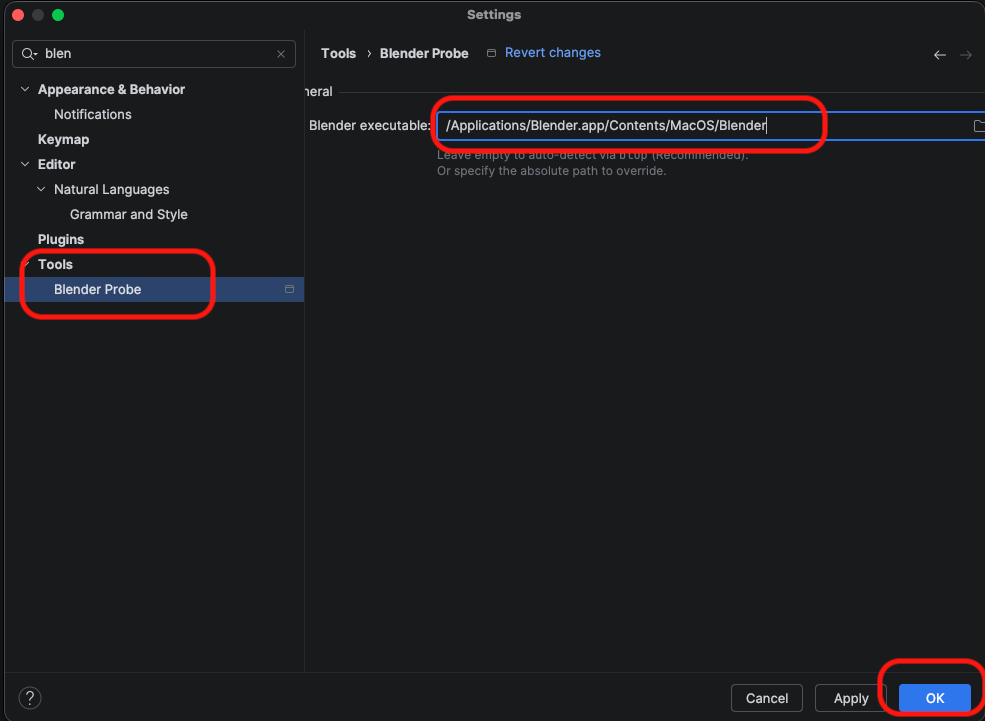
- Go to Settings/Preferences > Tools > Blender Probe.
- Set the Blender Executable Path:
- Windows:
C:\Program Files\Blender Foundation\Blender 5.0\blender.exe - macOS:
/Applications/Blender.app/Contents/MacOS/Blender - Linux:
/usr/bin/blender
- Windows:
- Click OK.