Tests
🚀 Fast Track: If you used the Project Wizard, fully configured test files (
tests/run_tests.pyandtests/test_sample.py) are already included.💡 Tip: Setting up tests that run on a real Blender instance while integrating natively with PyCharm (TeamCity) and ensuring the exact same configuration runs in CI is inherently complex. To set up tests in an existing project, the quickest way is to generate the test files using the Project Wizard in a temporary project and then copy-paste them into your own.
PyCharm native unit testing
You can use PyCharm unittest.
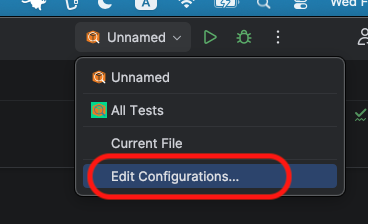
- Open Run/Debug Configurations.
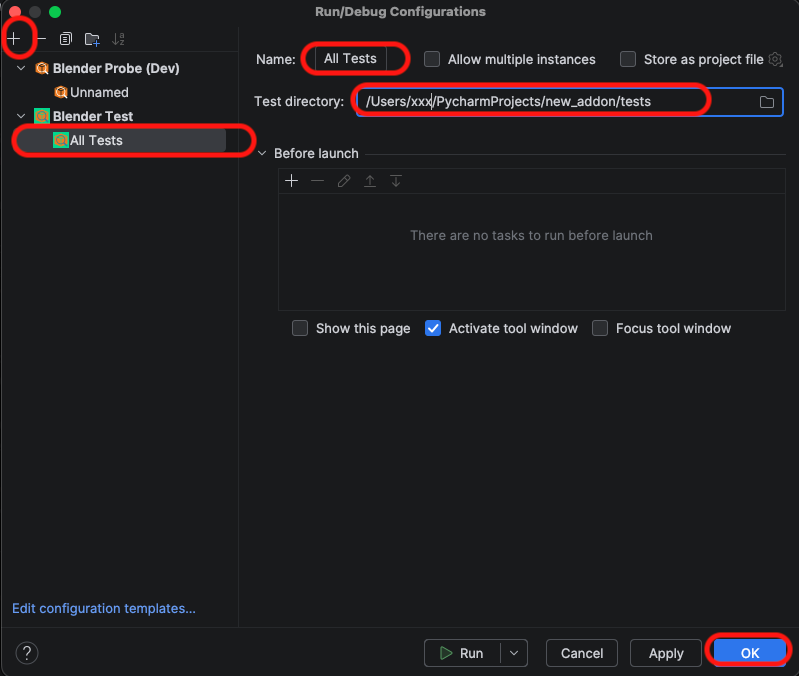
- Click the + button and select Blender Test.
- Name: Give it a name (e.g., “All Tests”).
- Test Directory: Select the folder containing your test scripts.
- Create a
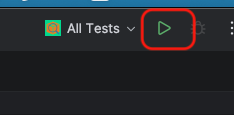
run_tests.pyfile like this template in your test folder. - Click the Run button.
Writing Tests
Once configured, you can implement tests as below and begin practicing TDD.
# test_sample.py
import unittest
import bpy
# from my_addon_package import operators  <-- Works automatically!

class TestSampleOperator(unittest.TestCase):
    """
    Integration tests for a custom operator.
    Runs inside Blender via Blender Probe.
    """

    def setUp(self):
        # 1. Reset Blender to a clean state
        bpy.ops.wm.read_homefile(use_empty=True)

        # 2. Setup a test scene (Create a Cube)
        bpy.ops.mesh.primitive_cube_add()
        self.test_obj = bpy.context.object
        self.test_obj.name = "TestCube"

    def test_operator_logic(self):
        """Verify that the operator renames the object and adds a property"""

        # [Arrange]
        # Ensure initial state
        self.assertEqual(self.test_obj.name, "TestCube")
        self.assertNotIn("is_processed", self.test_obj)

        # [Act]
        # Execute your custom operator (e.g., defined in your addon)
        # Context is automatically handled by Blender.
        result = bpy.ops.object.sample_operator()

        # [Assert]
        # 1. Check return value
        self.assertIn("FINISHED", result)

        # 2. Check side effects (Logic verification)
        self.assertEqual(self.test_obj.name, "TestCube_processed")
        self.assertTrue(self.test_obj.get("is_processed"))


if __name__ == "__main__":
    unittest.main()
CI
Projects created with the Blender addon wizard come with a pre-configured GitHub Actions workflow (.github/workflows/ci.yml).
- No Config: Just push your code to GitHub.
- Automatic Testing: The workflow automatically installs a headless version of Blender (Linux) and runs your tests using the same runner logic as the IDE.
- Linting: Ruff checks your code style.
- Dependabot: Keeps your actions and dependencies up to date.