Generating Code Stubs (Autocompletion)
To enable code completion for bpy and other Blender modules:
- Open your project in PyCharm.
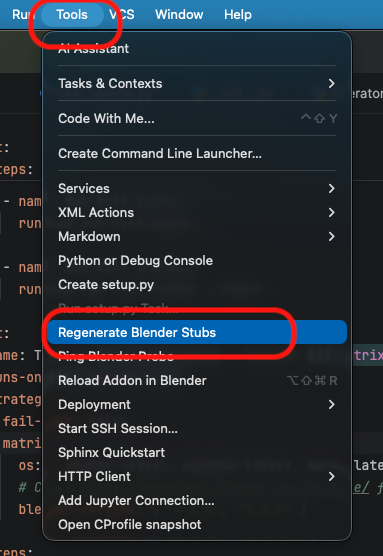
- Go to Tools > Regenerate Blender Stubs.
- Wait for the progress bar to finish. A hidden folder
.blender_stubswill be created in your project root and automatically marked as a Source Root.
💡 Tip: The
.blender_stubsfolder contains generated files that do not need to be version controlled. It is recommended to add.blender_stubs/to your project’s.gitignorefile. (If you created your project using the Blender Addon wizard, this is already configured.)
💡 Tip: Since Blender’s API is highly dynamic, PyCharm sometimes cannot infer types automatically. To get full autocompletion, use Type Hinting:
def my_func(context: bpy.types.Context):
    obj: bpy.types.Object = context.active_object
    print(obj.location) # Autocompletion works
💡 Tip: If the generated stubs don’t meet your needs, you can delete
.blender_stubsand use static stubs likefake-bpy-module. 💡 Tip: In teams that require reproducible type checking (mypy/pyright/pyrefly/ty) across environments or Blender versions, committing.blender_stubscan be a valid exception. If you do, configure.gitattributesaccordingly.